This is a cozy place where I can share my thoughts on various things I find myself reading in order to help promote literacy among young people. Feel free to make some recommendations for my reading list!
Remember those infographics?
Get link
Facebook
X
Pinterest
Email
Other Apps
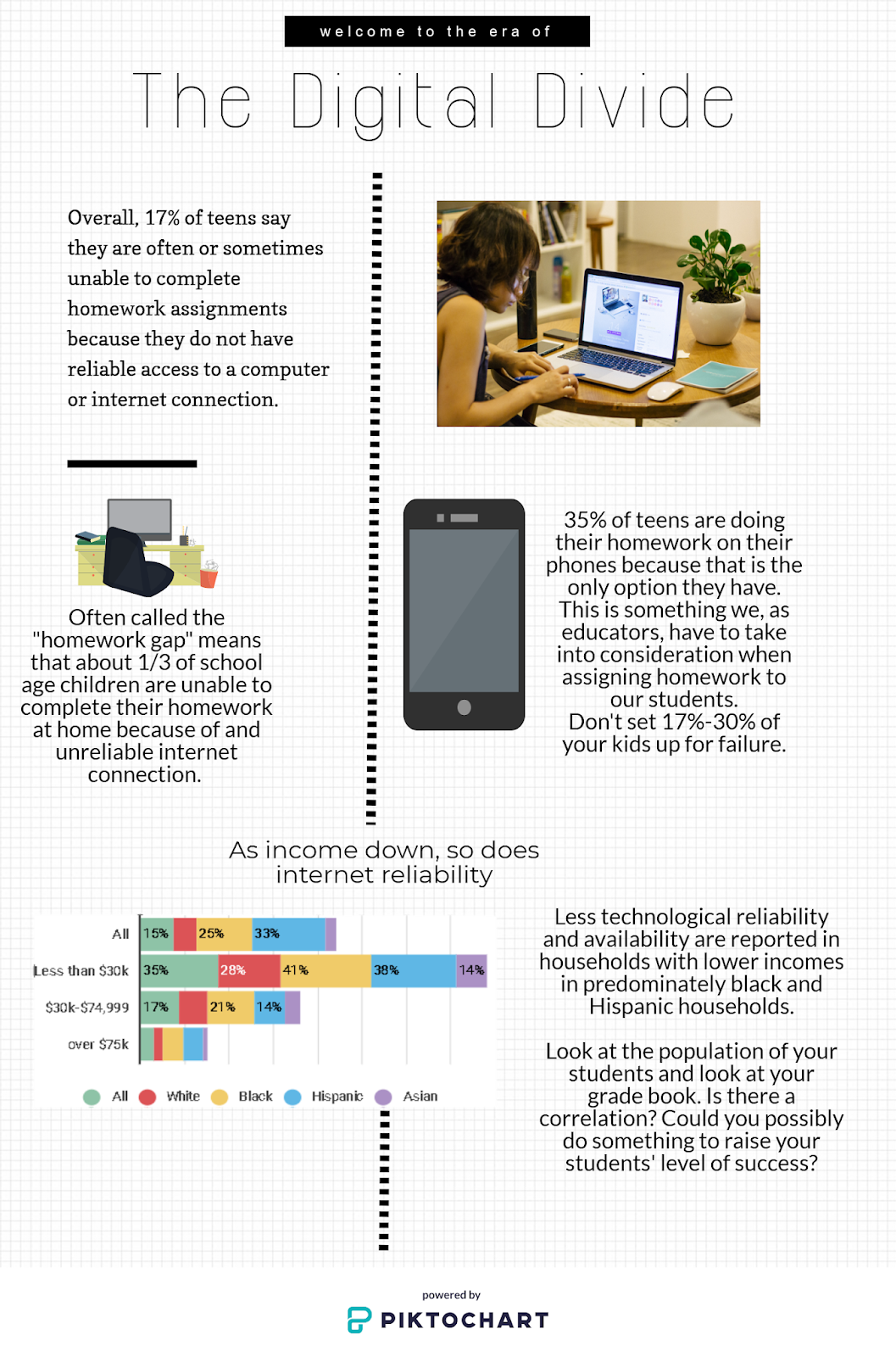
I used Piktochart (and Easel.ly for the chart) to create this infographic about an article you can find here. I started with a blank page and not a template so it was a struggle at first, but exploring it was fun.
Hi Dana! I liked your infographic, especially the chart. It was fun to play around with the different sites and see how much they can offer! I think that older kids would have a great time summarizing articles with infographics because of all the fun visuals they could make. Good job!:)
This is a great example of an infographic! I also love Piktochart. It is easy to use and makes quality graphics that students can really learn from...and produce!
Your infographic was an eye opener! It is stunning that more students do not have access to a computer or laptop at home with internet connectivity and they are only left with using their phones. It is definitely something for teachers to keep in mind when creating homework assignments. There is a huge push for teachers to use technology in the classroom, but students need to be given time to complete work in the class or in the library since they may not have access at home.
I don't know about you, but no matter how many times I see a screencast and think it's super-dandy, I still feel daunted by the idea of making my own. Why not? Well, aside from the fact that I tend to have a chipmunk digital voice, I don't even know where to start in regards to software! How much does it cost? How much digital space does it take up? Can I share it with literally every person I know (or is that excessive)? Well, here is a start. I checked out two screencasting options: Screencast-O-Matic (sounds like something from the Jetsons) and Screencastify (recommended by a techie co-worker). These can be used to show student how to do things for themselves in the library (tutorials that get requested a lot!), to help kids with homework even when you're not around! I definitely could have used a few of these videos in High School Calculus! Also, if you have a homebound student, the ability to send videos of what you're doing could be very beneficial! Here is ...
So this post will not directly address a book like all the others have! In this post, I will be sharing a little bit of information about a thing called a "Feed Reader." If you are the type of person who enjoys following various blogs but does not always enjoy surfing forever to find them, a feed reader is definitely something you need! They compile the posts on as many blogs as you would like to follow and present them to you as a feed. Its almost like Facebook, but with blogs instead of friends. There are a lot to choose from so navigate them carefully and decide which suits you better. Is it IOS friendly? Can I rate certain articles to better narrow down new blog choices? Is it free?! Will there be ads if I don't pay? Is the cost worth the convenience? As you can tell, I ask a lot of questions. The feed reader I chose to try out was Feedly, largely because it is free but also because it reminds me of Google's email server which is easy for me to navigate. S...
Hey there bloggers (and blogettes…bloggerettes?), The YouTube! So today I’m going to join the modern world and talk about YouTube in the library! I know lots of y’all out there (like me) think YouTube is a dangerous territory, which it can be, but it is also a valuable too. Who uses YouTube constantly? STUDENTS! What better way to share info with them than by using their own beloved communicative vehicle? I looked at a few neat videos posted by librarians and they’re sharing some really great stuff with a really wide audience! Here are some I thought would be a really valuable learning tool for the kids! This helps kids build a bibliography using GALE articles and easybib. “How to Pay for College” walkthrough (Fearless FAFSA). How to do research using Ebsco Host, (A skill I didn’t learn until halfway through college). A graphic US Constitution review, since we know government can be…complicated. Here are some I really think the kid...

Hi Dana! I liked your infographic, especially the chart. It was fun to play around with the different sites and see how much they can offer! I think that older kids would have a great time summarizing articles with infographics because of all the fun visuals they could make. Good job!:)
ReplyDeleteThis is a great example of an infographic! I also love Piktochart. It is easy to use and makes quality graphics that students can really learn from...and produce!
ReplyDeleteVery engaging infographic. Its simple and effective format delivers important stats in a way the doesn't overwhelm you. Mission accomplished!
ReplyDeleteYour infographic was an eye opener! It is stunning that more students do not have access to a computer or laptop at home with internet connectivity and they are only left with using their phones. It is definitely something for teachers to keep in mind when creating homework assignments. There is a huge push for teachers to use technology in the classroom, but students need to be given time to complete work in the class or in the library since they may not have access at home.
ReplyDelete